
IPTV APK: 4 Must-Have Apps for Powerful Live TV Streaming in 2025
IPTV APK: 4 Game-Changing Apps for the way we stream TV. Whether you’re on Android, Fire TV Stick, or Smart TV, these apps let you watch live channels, movies, and shows anytime, anywhere.
In this guide, we’ll cover the best IPTV APKs, how to install them, downloader codes you need, and where to get the best IPTV service in the UK with a free trial.
Main Takeaways
- IPTV APK is a simple Android app for streaming live TV via the internet
- You’ll get access to 24/7 channels, VOD, sports, and more
- Installation is easy with the downloader codes
- Use these apps on Fire TV Stick, Android TV, and other Android devices
- Always use a VPN for privacy and safety
What Is IPTV APK?
An IPTV APK is an Android application file that lets you stream live TV, video-on-demand, and more using Internet Protocol Television (IPTV)
It connects to IPTV servers and streams channels globally—no satellite or cable needed. Most IPTV APKs support M3U URLs, Xtream Codes, and Electronic Program Guides (EPG).
Why Use IPTV APK in 2025?
Here’s why IPTV APKs are popular in 2025:
Massive content access: Global channels, movies, series, and sports
Affordable: Most are free or under $10/year
Easy to use: Simple installation and playback
Flexible: Works on Android TV, Fire TV Stick, and phones
No contracts: Cancel anytime
Top 4 IPTV APKs with Downloader Codes
| App | Downloader Code | Features |
|---|---|---|
| IPTV Smarters Pro | 1741047 | Playlist support, EPG, external players |
| Hot IPTV | 3214597 | Live TV + 30-day free trial |
| IBO Player Pro | 4226429 | Smooth interface, paid premium version |
| B1G APP | 6463225 | Customizable layout, VOD, EPG |
How to Install IPTV Player Apps Using Downloader Codes
Before you can use these apps, you need to set up your Fire TV Stick or Android TV. Don’t worry—it’s easy! Follow these steps:
Enable Developer Options:
Go to Settings on your device.
Select My Fire TV (or Device on Android TV).
Click Developer Options.
Turn on Apps from Unknown Sources.
Watch this tutorial video for help.
Install the Downloader App:
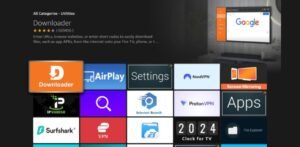
Download the Downloader app from the Amazon Appstore or Google Play Store
Allow Unknown Sources for Downloader:
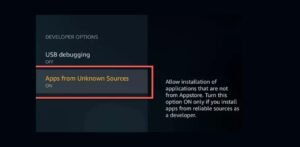
Back in Developer Options, make sure Apps from Unknown Sources is enabled for the Downloader app.
Watch this tutorial video for help
Now you’re ready to install the apps! Here’s how:
Open the Downloader app.
Type in the downloader code for the app you want.
If the code doesn’t work, use the full link provided instead.
Follow the instructions to download and install the app.
After installation, open the app and log in with your IPTV subscription details.
Note: Some apps, like HOT IPTV and IBO Player, need extra setup steps. We’ll cover those later!
Best IPTV UK Provider in 2025
If you’re in the UK and want the best overall IPTV experience, British Stream TV is your go-to choice in 2025.
Why British Stream TV stands out:
- Over 34,000 live channels and 190,000+ VOD
- Built-in VPN & 4-day catch-up
- Supports all major IPTV APKs like Smarters Pro, Hot IPTV, IBO Player, and more
- Ultra-stable connection with 99.9% uptime
- Affordable and flexible plans
British Stream TV is fully compatible with all apps mentioned in this article and works great on Android, Fire TV Stick, Smart TVs, and MAG devices.
IPTV Free Trial
Still not sure which IPTV provider to try?
You can get a 100% free IPTV trial from British Stream TV to test their full service before committing.
Claim your 24H IPTV Free Trial.
It’s risk-free, no credit card needed. Works with all IPTV APKs listed above.
Legal Notes and Safety Tips
- Some IPTV APKs may stream unlicensed content. Use legit providers only
- Always use a VPN to protect your privacy, avoid ISP throttling, and unlock geo-blocked content
- Stick to trusted APKs. Avoid unknown sources to stay safe from malware.
Recommended VPNs for IPTV Streaming:
- Surfshark – Affordable, unlimited devices, fast speeds
- NordVPN – Reliable, secure, great for streaming
- ExpressVPN – Best for speed and global servers
- Private Internet Access – Proven no-logs policy, strong encryption
Always connect to a VPN before launching your IPTV APK.
FAQs
What is an IPTV APK?
An IPTV APK is an Android app that streams live TV via the internet using IPTV protocols.
Are IPTV APKs free?
Some are free, while others, such as IBO or B1G APP Premium, are paid.
Do I need a VPN?
Yes. A VPN protects your data, hides your activity, and avoids ISP blocks.
Can I install IPTV APK on Fire TV Stick?
Yes. Enable unknown sources, install Downloader, and enter the APK code.
Which IPTV APK is best for live TV?
IPTV Smarters Pro, Hot IPTV, and B1G APP are solid options in 2025.
Are IPTV APKs legal?
Only if they stream licensed content, always verify before use.
What’s an M3U playlist?
It’s a URL from your IPTV provider that contains your channel list.
Conclusion
If you’re tired of cable and want full control over what you watch, IPTV APK: 4 Game-Changing Apps are the way to go. From live sports to movies, these apps give you premium entertainment at a fraction of the price. Use the downloader codes, follow the install steps, and start streaming today. Just remember—always use a VPN and stick to trusted apps. Would you be ready to upgrade your streaming setup? Try Hot IPTV (Code: 3214597) or IPTV Smarters Pro (Code: 1741047) and enjoy the power of IPTV in 2025. And if you’re in the UK, don’t miss out on British Stream TV – the top-rated provider for speed, support, and selection.
Want to try it first? Grab your free 24H IPTV trial here.
Leave a Reply