How to Get IPTV Smarters on Firestick Free in Less Than 5 Minutes (2025 Guide)
Installing IPTV Smarters on Firestick free is one of the easiest ways to watch live channels, sports, and movies without needing cable. This step-by-step guide shows you how to install it fast and free, even if you’ve never done it before. We’ll also cover the best IPTV service to use with it, how to unblock content with a VPN, and how to improve your overall experience.
Main Takeaways
- You can’t install IPTV Smarters from the Amazon Appstore
- Use the Downloader app with code 1741047
- Setup takes less than 5 minutes
- IPTV Smarters Pro is free
- Works perfectly with British Stream TV
- Use the ream Codes login for smoother performance
- A VPN improves privacy and avoids ISP blocks
What Is IPTV and How Does It Work?
IPTV stands for Internet Protocol Television. Instead of using traditional cable or satellite, IPTV streams live TV and video-on-demand over the internet.
You need:
- An app like IPTV Smarters Pro
- A subscription or M3U/Xtream playlist from an IPTV provider like British Stream TV
- A device like the Amazon Fire TV Stick
The app doesn’t include any channels. It’s just a media player. You load your own IPTV playlist into the app to unlock your content.
What Is IPTV Smarters Pro?
IPTV Smarters Pro is a powerful and user-friendly IPTV player that supports live TV, series, movies, and catch-up features. It’s one of the most downloaded IPTV apps on Fire TV and Android.
Key features include:
- Login with Xtream Codes API
- Support for M3U playlists
- Multi-screen streaming
- Picture-in-picture (PiP)
- TV Guide (EPG) support
- Parental controls
- External video player support (like VLC)
Pro Tip: Always choose the Xtream Codes API login if your provider offers it. It’s faster, more stable, and supports better features like EPG and catch-up.
How to Get IPTV Smarters on Fire TV Stick Free
Reveal Developer Options (if missing)
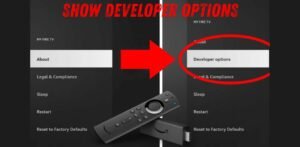
On newer Fire TVs, Developer Options are hidden. You’ll need to unhide them before enabling third-party installs.
Watch this guide:
How to Reveal Developer Options on Fire TV Stick
Enable Apps from Unknown Sources
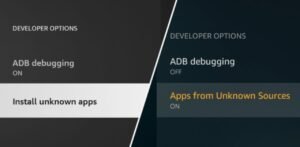
- Go to Settings > My Fire TV > Developer Options
- Turn on ADB Debugging
- Turn on Apps from Unknown Sources
Watch this video if needed:
Enable Apps from Unknown Sources
Install the Downloader App
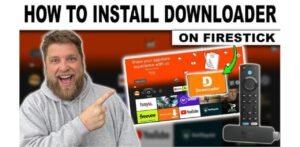
- Go to the Fire TV Stick Search bar
- Type Downloader
- Install the orange icon app by AFTVnews
Need help?
Use the Downloader Code to Install IPTV Smarters
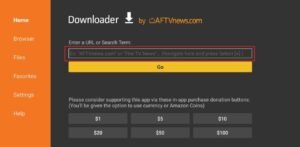
- Open the Downloader app
- Enter this code: 1741047
- Press Go
- Wait for the app to download
- Click Install
You’ve now installed IPTV Smarters Pro on Fire TV Stick for free in under 5 minutes.
How to Use IPTV Smarters on Fire TV Stick
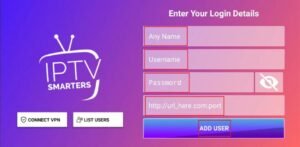
Once installed:
- Open the app
- Accept all permissions
- Choose “Login with Xtream Codes API” (recommended)
- Enter your IPTV login details from a provider like British Stream TV
You’re now ready to start watching.
Use a VPN with IPTV on Fire TV Stick
Some ISPs block or throttle IPTV traffic. Using a VPN keeps your connection private and stable.
Install a VPN on Fire TV Stick with this guide:
How to Download a VPN on Fire TV Stick
Best VPNs for IPTV on Fire TV Stick
We recommend:
- Surfshark – Works Best with IPTV
- NordVPN
- ExpressVPN
- Private Internet Access
All of these are fast, secure, and IPTV-friendly.
How to Add Favorite Channels in IPTV Smarters
- Go to the Live TV section
- Hold the select button on the channel
- Choose Add to Favourites
You can now access them quickly from the Favourites tab.
Useful Links
- Official IPTV Smarters Website
- British Stream TV – Premium IPTV Provider
- Downloader Code:1741047
Video Tutorials:
- Reveal Developer Options
- Install Downloader on Fire TV Stick
- Allow Unknown Sources on Fire TV Stick
- Download VPN on Fire TV Stick
FAQs
Is the IPTV Smarters player free?
Yes. IPTV Smarters Pro is completely free to download and use. You only need an IPTV subscription or playlist to stream content.
Which IPTV is best for Fire TV Stick?
The best option is British Stream TV. Gives you access to over 30k+ live channels, fast 4K streaming, 190k+ movies and shows, 24/7 support, and full compatibility with IPTV Smarters Pro.
How to add favorite channels on Fire TV Stick IPTV Smarters for free?
- Open Live TV
- Long-press the channel you like
- Tap Add to Favourites
You can then access them from the favourites tab.
What is the best free VPN for IPTV on Fire TV Stick?
We recommend premium VPNs for the best IPTV experience. These are fast, private, and IPTV-optimized:
- Surfshark – Best for IPTV
- NordVPN
- ExpressVPN
- Private Internet Access
Conclusion
Getting IPTV Smarters on Firestick in 2025 is quick, simple, and completely free when you follow the right steps. With just a few minutes of setup, you can turn your Firestick into a powerful streaming hub for live TV, sports, movies, and series. The app itself is lightweight, ad-free, and works smoothly on all Fire TV devices.
They’ll help you avoid buffering, bypass ISP throttling, and access global content.
Leave a Reply